Start typing to search

PatientsDental MarketDental Cloud

One screen.
Every patient who
needs you today.

PatientsDental shows your front desk exactly who to call:
overdue recalls, unconfirmed visits, no-shows.
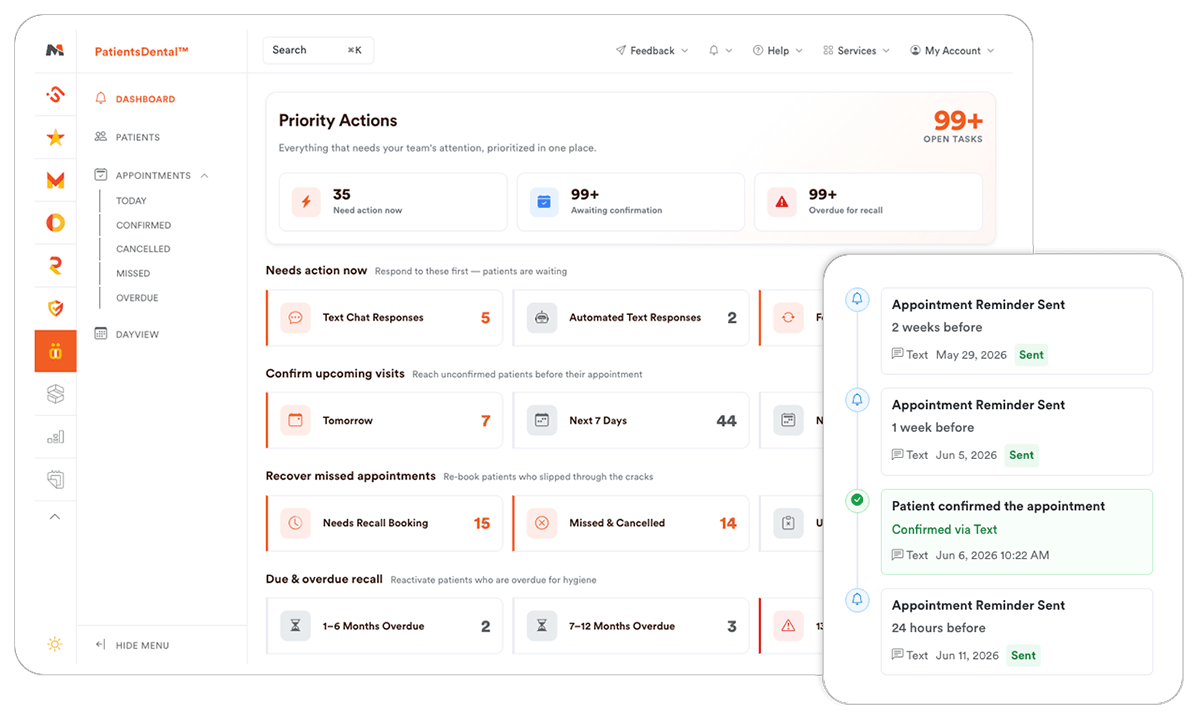
PatientsDental<small class='opacity-50'>™</small> dashboard screenshot
100%
of missed recall slots visible in one view
4 views
Dashboard · Patients · Appointments · DayView
Call popups
Call notifications with patient dashboard popup
Live sync
Integrated with your PMS

The real cost of disorganized follow-up

Stop losing patients.

Everyday problems PatientsDental was built to solve.

You don't know who to call first

The recall list is 400 names long. There's no priority order, no urgency flag, no sense of who's 6 months overdue versus 18. Staff guess, or don't call at all.

Cancellations and no-shows go cold fast

A patient cancels Monday morning. By Tuesday, nobody's followed up. By Friday, the slot is just lost revenue — and the patient booked somewhere else.

Tomorrow's schedule isn't confirmed

It's 4pm. You don't know which of tomorrow's 28 patients actually confirmed. You're either calling everyone or hoping for the best.

Patient info is scattered

Phone number in the PMS. Last note in a sticky on the desk. Recall status in a spreadsheet. Your team wastes 3 minutes every time they pick up the phone.

Sending forms means switching apps

Staff open SignForms in a separate tab, look up the patient again, find the right form, copy a link, go back to messages, and paste it. Four steps too many.

Review requests get forgotten

The hygienist had a great appointment. The patient was happy. Then nobody sent a feedback request, and that Google review never happened.

Priority Action Dashboard

One screen. Every patient who needs you today.

The dashboard shows live counts grouped by urgency — so the first thing your team sees each morning is a prioritized action list, not a raw PMS report.

Clicking any card opens the filtered patient list. No extra steps.

Needs action now
7
Follow-ups due today
3
Cancellations to re-engage
Awaiting confirmation
12
Unconfirmed — tomorrow
+24 next 7 days · +41 next 14 days
No next appointment
18
Hygiene done — recall not booked
Due & overdue recall
29
1–6 months overdue
14
7–12 months overdue
6
13–18 months overdue

How it works

See it. Open it. Act on it.

PatientsDental is built around one workflow: find the patient who needs attention, open their file, and do something about it. All without leaving the app.

1
Dashboard shows you who needs attention and why

Every morning, your team sees live counts for unconfirmed visits, cancelled appointments, overdue recalls, and follow-ups due today. No spreadsheet. No guesswork. Just a prioritized list pulled directly from your PMS.

2
Click a card to open the right patient list

Each dashboard card opens a pre-filtered list — sorted, color-coded by appointment status, and ready to work from. Filter by today, this week, or the next 30 days. Switch between confirmed, cancelled, missed, or overdue in one click.

3
Open the patient file and act

Click any row to open the full patient file — contact details, upcoming appointments, notes, submitted forms, recall status, and reminder history. From there, send a text, dispatch a form link, request a review, or add a follow-up note. Everything in one panel.

4
Check the day schedule at a glance

DayView shows every operatory, every appointment, and every provider for the selected day — color-coded by status. Click any block to open the patient. Date persists in the URL, so linking to a specific day is instant.

5
Notes and follow-ups stay with the patient

Add clinic notes with an optional follow-up task — schedule appointment, call back, check insurance, and more. Notes show who wrote them and when. Follow-ups surface back on the dashboard when they're due.

Patient File

Everything about a patient.
One place, one click away.

No more switching between the PMS, a messaging app, and a form platform. The patient file pulls it all together.

Contact & demographics

Name, DOB, age, gender. Click-to-copy phone and email. No re-typing.

Upcoming appointments

Next 2 years of scheduled visits, each showing provider and PMS status.

Forms & recall status

View submitted SignForms with PDF preview. See recall due dates and what's overdue.

Reminder history

See every automated reminder sent — 2-week, 1-week, 24-hour — and whether the patient confirmed.

Appointment status at a glance

Unconfirmed Confirmed Cancelled No-Show Overdue / Alert

Built-in integrations

Your other tools work inside it.

PatientsDental connects to the rest of your MarketDental stack and reads live data from your PMS, so your team never has to copy-paste or switch windows to take action.

SignForms™ YellowStars™ Messages™ Re.Call.Dental™ Call.Dental™ VaultDental™
Send forms without leaving the patient

Select the forms, generate the link, send by SMS, all from inside the patient file. The submitted form shows up in the same panel.

Request a review while it's still fresh

Send a YellowStars feedback request by email, SMS, or both — straight from the patient file, right after a good appointment.

Text the patient without switching apps

Open or continue a Messages™ conversation directly from the patient file. The thread is attached to their record, not buried in a separate inbox.

Live PMS data — no manual import

PatientsDental reads directly from your practice management software. Patient records, appointments, and recall data stay current automatically.

Call2Action
🔕 Sorry, we're currently closed. Please send us a message and we'll get back to you as quickly as possible.